Posts

Message stuck in Outbox

Image
In Microsoft Outlook 2010 you may see the message got stuck in your Outbox without the timestamp. This happens when you work offline and then connect to the network. Opening the email from the Outbox and clicking on "Send" does nothing. Of course you can open the unsent email, copy and paste the content into a new email and then send it, but there are more efficient ways: As a workaround you can move the unsent message to the Drafts folder. Then open it and click "Send". Disable or uninstall iCloud add-in Check for the active send delay rule. This may cause the trouble.

Avast deletes tcpip.sys on Windows XP

Recent Avast update 121205-1 may leave you without internet connection by deleting tcpip.sys file. It happens mostly if the file TCPIP.SYS has been patched with TPC/IP patcher like Lvllord's (it increases the limit of concurrent half-open connections). If this is the case - the easiest way to resolve the problem is to restore tcpip.sys file from the scratch. You can download the file from here . The archive contains two folders tcpip2180 is for Windows XP SP2 and tcpip5625 is for Windows XP SP3. All you need to do is to unzip tcpip.sys to both C:\Windows\System32\drivers and C:\Windows\System32\dllcache folders. You'll also need to make the following changes to the registry: HKLM\System\CurrentControlSet\Services\TcpIP  (DWORD) Start=1 Tag=3 Type=1 Reboot the computer after that and you should be all set. *Advise: Deleting registry entries incorrectly may cause serious problems to your operating system. Please make sure you are able to perform t...

Nokia to Samsung phone contacts transfer. How to

Image
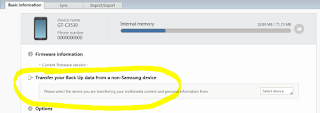
Update from 21/12/2012: A BIG thanks goes to Samsung for their updated Kies v.2.5.1.12123_2. It is now possible to transfer backup data from a non-Samsung device directly from the Kies! You can transfer the data from Nokia, Apple, LG and BlackBerry phones (*.nbu, *.idx and *.bbb files supported). *** It's obvious that the easiest way to transfer contacts from one phone to another is use Bluetooth. (Turn Bluetooth "on" on each device; open contacts; then in options mark all; then in options "send to" via Bluetooth). But in some cases e.g. Nokia C2-01 to Samsung GT-C3530 data transfer it's not possible to send all contacts at once. In this case you'll need Microsoft Outlook, Nokia PC Suite and  SAMSUNG Kies PC Sync . Steps are the following: Start Nokia PC Suite Synchronise your contacts to MS Outlook Connect Samsung phone Start Kies Synchronise contacts from MS Outlook to Kies Sync Kies conatcts with your Samsung phone

Distorted cell display in Excel 2010

Image
Problem : MS Excel cells are wrong or distorted like on the picture below. It have been seen on different computers with different files while scrolling or copy-pasting. Solution : terminate the ipoint.exe process  and configure the system to not load ipoint.exe upon startup (using msconfig or regedit).

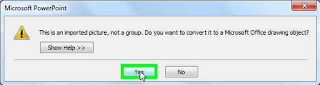
PowerPoint crash when scrolling through slides (kernelbase.dll or oart.dll)

Image
Problem: Microsoft PowerPoint 2010 may crash while you are copypasting slides or scrolling through them in Slide Sorter view. If you check the Application log in the Event Viewer, you may find something similar to this record: Faulting application name: POWERPNT.EXE, version: 14.0.6009.1000, time stamp: 0x4cc1a4ed Faulting module name: KERNELBASE.dll, version: 6.1.7601.17651, time stamp: 0x4e211319 Exception code: 0xe0000002 Fault offset: 0x0000b9bc Faulting process id: 0x5a8 Faulting application start time: 0x01cdc3cbb1c20f5b Faulting application path: C:\Program Files (x86)\Microsoft Office\Office14\POWERPNT.EXE Faulting module path: C:\WINDOWS\syswow64\KERNELBASE.dll Report Id: 484578ef-3244-11e2-88e2-0026b9efd81c Solution : First of all make sure that it happens only to the specific presentation file. Then go to the master and check if you have any graphical elements in it. They are generating 99% of the problems. In my specific case it was Windows Metafile object...

How to change additional drivers printer defaults on the server

Imagine a situation: you have Windows 2003 x86 server working as a print server and you have a bunch of Windows 7 x64 machines that uses network printers installed on the server. If you need to change printing defaults for Windows 7 machines you cannot do that on the server because only x86 driver settings are availble. To change defaults for Windows 7 64 bit clients you need to: Open a share \\servername from Win7 machine (using admin credentials) Click on the "View remote printers" Right click on the printer name> Properties> Advanced tab> Printing defaults… Change everything you need and click OK If you are just want to know how to update x64 printer drivers on the x86 print server then you should definetely use Print Management console on your Windows 7 x64 system.

Xerox 116-324 fault when printing .doc or .pdf containing callibri fonts

Image
Problem : You are unable to print .PDF or .DOCX documents which contain Calibri fonts. The Xerox 7345 or similar model sends 116-324 error code and needs to reboot. Resolution : Update you computer with the latest drivers from Xerox website. If you are on PCL driver - disable the Print Optimization feature in the driver. If you are on the PS driver set the PostScript Output Option to Optimize for Portability. The print file will be larger and printing will take more time. Another PS driver setting may screw up the text in your PowerPoint slides (as shown on the picture below). It is "PostScript Pass-through". If you have printouts like on the picture below, you better enable "PostScript Pass-through" (Printing preferences> Advanced> Driver section. )